







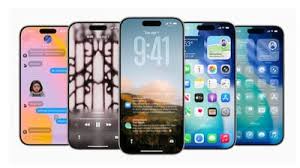
iOS 26 Update Released: New Design, Features, and Supported iPhones
Apple has officially rolled out the iOS 26 update on Monday, introducing a refreshed Liquid Glass design, faster app performance, and new AI-powered tools. The update is available globally across a wide range of iPhones.
Interestingly, Apple has skipped directly from iOS 18 (which powered last year’s iPhone 16 series) to iOS 26, marking a major version jump. The release also comes just ahead of the iPhone 17 series launch, with iOS 26 pre-installed on all new devices, including the iPhone Air.
How to Install iOS 26
- Open Settings
- Tap General
- Select Software Update
- Look for iOS 26
- Enter your passcode and install
- Reboot your iPhone to complete the update
Supported iPhones
- iPhone 11, 11 Pro, 11 Pro Max
- iPhone SE (2nd gen and later)
- iPhone 12, 12 mini, 12 Pro, 12 Pro Max
- iPhone 13, 13 mini, 13 Pro, 13 Pro Max
- iPhone 14, 14 Plus, 14 Pro, 14 Pro Max
- iPhone 15, 15 Plus, 15 Pro, 15 Pro Max
- iPhone 16e, 16, 16 Plus, 16 Pro, 16 Pro Max
- iPhone 17 series (ships with iOS 26 pre-installed)
Note: To access the latest Apple AI features, you’ll need an iPhone 15 Pro or newer.
What’s New in iOS 26
- Liquid Glass Design: A sleeker, glass-like interface with intuitive swipe and scrolling across apps and tabs.
- Adaptive Battery Saver: AI-powered tool that learns usage patterns to extend battery life.
- Performance Boost: Faster app launches and smoother multitasking.
- Camera Upgrades: New tweaks for improved photography.